
Boxplot: Ein leistungsstarkes Datenvisualisierungstool
Ein Boxplot ist eine grafische Darstellung, die die wichtigsten statistischen Maße eines Datensatzes veranschaulicht – Minimum, erstes Quartil, Median, drittes Quartil und Maximum. Es wird häufig in der Datenanalyse verwendet, um die Verteilung und Schiefe von Daten zu visualisieren.
Einführung
The Box-Plot, auch Box-Whisker-Plot genannt, ist eine grafische Darstellung der fünf wichtigsten Kennzahlen eines Datensatzes: Minimum, erstes Quartil (25. Perzentil), Median (50. Perzentil), drittes Quartil (75. Perzentil) und Maximum. Dieses in den 1970er-Jahren von John Tukey entwickelte Diagrammsystem ist für seine prägnante Darstellung der Datenverteilung bekannt und vereinfacht somit die Datenanalyse Prozess.
Es ist ein leistungsstarkes Werkzeug derDatenanalyseda es die zentrale Tendenz, die Streuung und die Schiefe eines Datensatzes deutlich hervorhebt. Darüber hinaus visualisiert es Ausreißer effektiv und liefert so ein umfassendes Bild der Datenverteilung. Dies ist besonders nützlich beim Vergleich mehrerer Datensätze, da es eine klare, vergleichende Visualisierung der verschiedenen Datenverteilungen ermöglicht.
Highlights
- Der Boxplot stellt fünf kritische statistische Maße eines Datensatzes grafisch dar.
- Der Median im Kasten gibt die zentrale Tendenz der Daten an.
- Die Quartile Q1 und Q3, die die Boxenden markieren, spiegeln die Streuung der Daten wider.
- Die Whisker des Boxplots erreichen die minimalen und maximalen Nicht-Ausreißer-Datenpunkte.
- Ausreißer werden als Datenpunkte berechnet, die unter (Q1 – 1.5IQR) oder über (Q3 + 1.5IQR) fallen.
Anzeigentitel
Werbebeschreibung. Lorem ipsum dolor sit amet, consectetur adipiscing elit.
Die wesentlichen Komponenten eines Boxplots
A Box-Plotist ein vielseitiges Werkzeug zur visuellen Darstellung wichtiger statistischer Kennzahlen. Er besteht aus mehreren Komponenten, die jeweils unterschiedliche Einblicke in die Datenverteilung ermöglichen.
Im Zentrum des Boxplots steht derMedian, dargestellt durch eine Linie innerhalb der Box. Der Median des zweiten Quartils (Q2) ist der Mittelwert, der die Daten in zwei Hälften teilt. Er misst die zentrale Tendenz und liefert eine Momentaufnahme des Zentrums der Daten.
Die Box wird anschließend durch daserste Quartil (Q1)und diedritte Quartil (Q3)definiert . Diese Quartile entsprechen dem 25. bzw. 75. Perzentil des Datensatzes. Die Q1-Markierung markiert den Median der ersten Hälfte der Daten, während Q3 den Median der zweiten Hälfte darstellt.
Die Länge des Kastens entspricht demInterquartilsabstand (IQR), berechnet durch Subtraktion des ersten Quartils (Q1) vom dritten Quartil (Q3) (IQR = Q3 – Q1). Der IQR misst die Streuung der Daten und gibt damit die mittleren 50 % an.
The Whiskersind Linien, die sich vom Kasten erstrecken und die minimalen und maximalen Datenpunkte ohne Ausreißer erreichen. Üblicherweise verläuft der untere Whisker vom ersten Quartil (Q1) zum kleinsten Datenpunkt ohne Ausreißer und der obere Whisker vom dritten Quartil (Q3) zum größten Datenpunkt ohne Ausreißer.
Ausreißerwerden typischerweise als Datenpunkte definiert, die unterhalb (Q1 – 1.5IQR) oder oberhalb (Q3 + 1.5IQR) liegen. Diese Ausreißer werden im Boxplot als einzelne Punkte außerhalb der Whisker dargestellt.
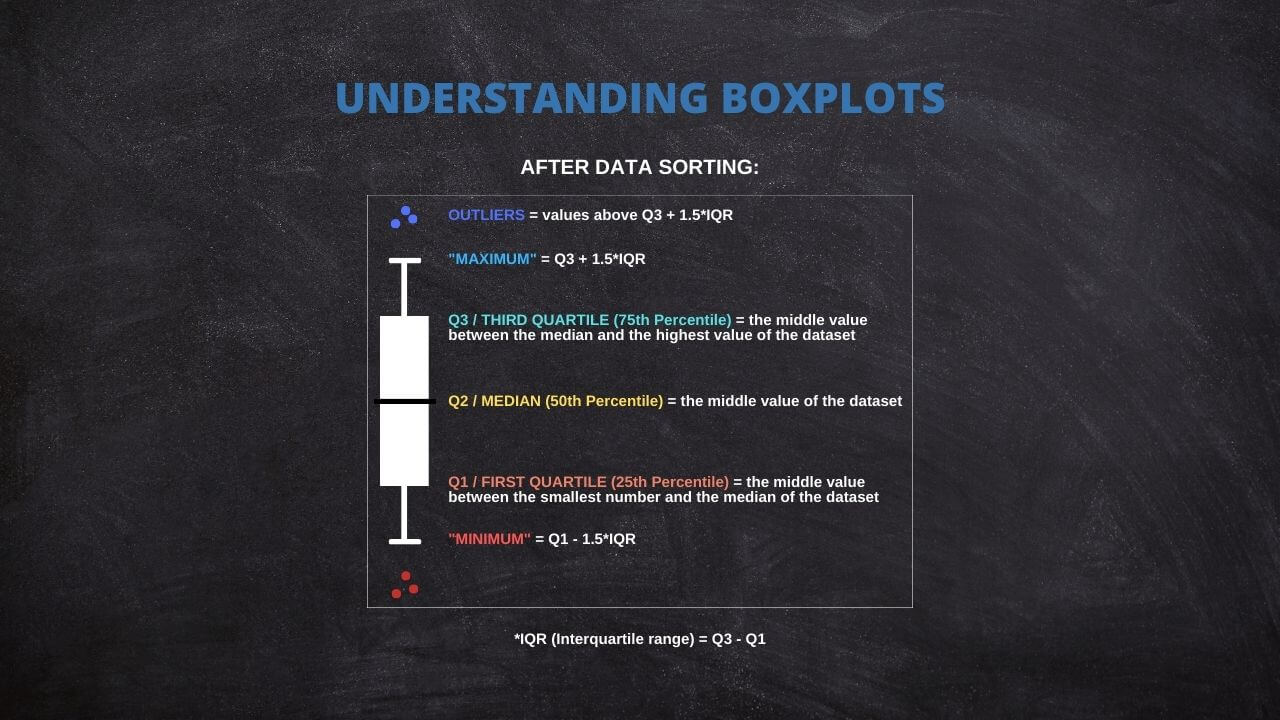
Das Verständnis dieser Komponenten eines Boxplots ermöglicht ein schnelles Verständnis der Verteilung, Streuung und Schiefe der Daten. Es hilft auch bei der Identifizierung und Visualisierung potenzieller Ausreißer, was bei der Datenanalyse von unschätzbarem Wert sein kann.
Generieren Sie Ihre eigenen Boxplots: Ein interaktives Tool
Befolgen Sie diese Anweisungen, um Ihren interaktiven Boxplot zu erstellen:
1. Anzahl der Boxplots: Geben Sie die Anzahl der Boxplots ein, die Sie erstellen möchten.
2. Beschriftung der X-Achse: Geben Sie die gewünschte Beschriftung für die X-Achse ein.
3. Y-Achsenbeschriftung: Geben Sie die gewünschte Beschriftung für die Y-Achse ein.
Geben Sie für jeden Boxplot, den Sie generieren möchten, die folgenden Informationen an:
4. Boxplot-Name: Geben Sie für jeden Boxplot einen eindeutigen Namen ein.
5. Boxplot-Daten: Geben Sie die Daten für jeden Boxplot in das dafür vorgesehene Textfeld ein. Achten Sie darauf, pro Zeile einen Datenpunkt einzugeben.
Klicken Sie nach der Eingabe Ihrer Daten auf die Schaltfläche „Plot aktualisieren“, um Ihre Boxplots zu erstellen.
Guide to Create a Box Plot on R
R is a go-to language in data science because of its statistical computation and graphic generation robustness. Let's take a quick tour of creating a Box Plot using R.
Firstly, install and load the ggplot2 package:
install.packages("ggplot2")

library(ggplot2)
Suppose you have a dataset and wish to create a box plot of a variable, var. The code snippet would be:
ggplot(data, aes(x = "", y = var)) +

  geom_boxplot() +

  theme(axis.title.x=element_blank())
This creates a simple box plot. To add more complexity or visual features, ggplot2 offers a other options that can be appended to this code.
Practical Applications of Box Plot
Box Plots find their usage in a wide range of real-world applications. For instance, box plots can be used in healthcare to compare the effectiveness of different drugs or treatments. They may be used in finance to compare the performance of other investment portfolios.
A powerful application of box plots is in A/B testing, where they can help determine if there's a significant difference between the groups. Furthermore, they're frequently used in exploratory data analysis for identifying outliers and understanding the data distribution.
The Versatility of Box Plots
While the traditional components of a Box Plot include the minimum, first quartile (Q1), median, third quartile (Q3), and maximum, it's worth noting that some statistical software offers flexibility in defining these measures.
For instance, specific programs allow replacing these traditional measures with others, such as mean, standard deviation (SD), confidence intervals (CI), etc. This adaptability will enable users to tailor their box plots to suit their specific analytical needs or preferences.
Thus, box plots remain not just a fundamental tool for data visualization but a versatile one that can be customized across different software platforms. Always review the documentation or the settings of your chosen statistical software to fully leverage these capabilities.
Common Misconceptions When Using Box Plot
Box Plots can sometimes be misinterpreted despite their utility, leading to flawed conclusions. A common misconception is to equate the box's length with the number of data points. In reality, it represents the data's spread.
Another error is in the interpretation of outliers. Outliers are not necessarily "bad" data points to be eliminated but may provide important insights about the dataset. Therefore, careful consideration is required before any decision to remove them.
Lastly, while box plots are efficient for summarizing data, they do not show the data's shape in detail, as a density plot or a histogram would. Therefore, they are best used with other data visualization tools for a more complete data analysis.
Ad Title
Ad description. Lorem ipsum dolor sit amet, consectetur adipiscing elit.
Recommended Articles
Interested in learning more about statistics and data analysis? Explore our blog for more articles and tutorials that will help you enhance your data skills!
- How To Select The Appropriate Graph?
- Create Great Graphs Easily (+Bonus)
- Which is Better, Mean or Median?
- Boxplots - an overview (External Link)
- How to Create Regression Lines in Excel
- Box Plot Skewness: A Visual Guide to Asymmetry
Frequently Asked Questions (FAQ)
It's a graphical representation of a five-number summary of a dataset: minimum, Q1, median, Q3, and maximum.
Box Plots provide a visual summary of data distribution. They are handy for identifying outliers and skewness in the data.
The box represents the IQR, covering 50% of data points from the first quartile (Q1) to the third quartile (Q3).
The line inside the box signifies the median, a measure of the data's central tendency.
Outliers are typically represented as individual points outside the whiskers in the box plot.
Outliers are usually calculated as data points that fall below (Q1 - 1.5IQR) or above (Q3 + 1.5IQR).
Some statistical software allows replacing traditional measures with others such as mean, standard deviation, confidence intervals, etc.
Whiskers extend from the box to the minimum and maximum non-outlier data points, thus showing the range of the data.
You can input your data and create a box plot with statistical software like R or Python or an interactive web tool.
Yes, Box Plots are widely used in fields like healthcare, finance, and A/B testing for quick visualization and interpretation of data.